
How to use abs digital rf thermostat
author: LIly
2025-09-11
How to Use ABS Digital RF Thermostat
In the realm of smart home heating and cooling systems, the thermostat plays a pivotal role in maintaining optimal indoor temperatures while ensuring energy efficiency. Among the top choices for homeowners and professionals alike is the ABS Digital RF Thermostat, a cutting-edge device designed to offer precise temperature control and seamless connectivity. This blog will walk you through every step of using this advanced thermostat, from unboxing to advanced settings, with a special focus on integrating it with Riseem’s innovative solutions.
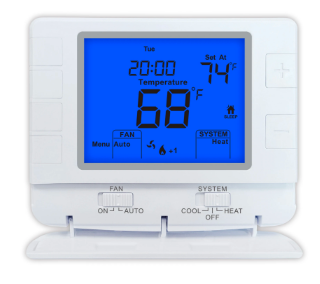
1. Understanding the ABS Digital RF Thermostat: Key Features
Before diving into usage, it’s essential to familiarize yourself with the core features of the ABS Digital RF Thermostat. This thermostat stands out for its:
- ABS Material Construction: Durable, heat-resistant, and suitable for long-term use in various indoor environments.
- Digital Display: Clear, backlit screen that shows real-time temperature, mode, and settings for easy readability.
- RF (Radio Frequency) Connectivity: Enables wireless communication with heating/cooling systems, eliminating the need for complex wiring.
- Programmable Schedules: Allows you to set custom temperature routines based on your daily or weekly schedule, saving energy when you’re away.
- Compatibility with Riseem Systems: Designed to work seamlessly with Riseem’s smart home ecosystem, enhancing control and functionality.
For more detailed specifications, you can visit www.riseem.cn, where Riseem provides in-depth product information and support resources.
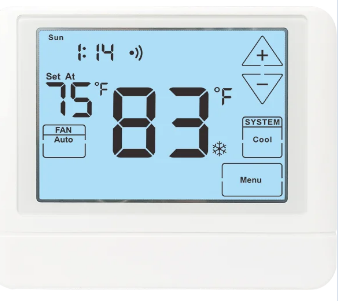
2. Pre-Installation Preparation: What You Need
Before installing your ABS Digital RF Thermostat, gather the following items to ensure a smooth process:
- The ABS Digital RF Thermostat unit (including the main display and RF receiver).
- A screwdriver set (flathead and Phillips, as needed).
- A voltage tester (to ensure safety during wiring, if required).
- The user manual (available for download on www.riseem.cn if you misplaced the physical copy).
It’s also important to turn off the power to your heating/cooling system at the circuit breaker before starting any installation work—this prevents electrical hazards and protects the thermostat and your equipment.
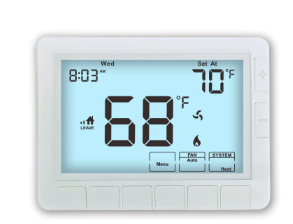
3. Step-by-Step Installation of the ABS Digital RF Thermostat
Installing the ABS Digital RF Thermostat involves two main parts: setting up the RF receiver and mounting the thermostat display. Follow these steps carefully:
- Install the RF Receiver:
-
- Locate the control panel of your heating/cooling system (e.g., furnace, heat pump).
-
- Open the control panel and identify the wires labeled “R,” “W,” “Y,” and “G” (these correspond to power, heat, cooling, and fan, respectively).
-
- Connect the wires from your system to the matching terminals on the RF receiver (refer to the user manual for wiring diagrams—you can also find a video tutorial on www.riseem.cn).
-
- Secure the RF receiver inside the control panel using the included screws, then close the panel.
- Mount the Thermostat Display:
-
- Choose a location for the thermostat display: it should be away from direct sunlight, drafty areas (e.g., windows, doors), and heat sources (e.g., lamps, vents) to ensure accurate temperature readings.
-
- Use the mounting plate as a template to mark drill holes on the wall.
-
- Drill the holes, insert wall anchors (if needed), and attach the mounting plate to the wall with screws.
-
- Connect the display unit to the mounting plate (most models snap into place), then turn the power back on at the circuit breaker.
4. Basic Operation: Setting Temperature and Modes

Once installed, the ABS Digital RF Thermostat is easy to operate. Here’s how to use its basic functions:
- Turn On the Thermostat:
-
- Press the “Power” button on the display— the screen will light up, showing the current room temperature.
- Select a Mode:
-
- Use the “Mode” button to cycle through options: “Heat,” “Cool,” “Auto,” or “Fan Only.”
-
- “Auto” mode automatically switches between heating and cooling to maintain your desired temperature, while “Fan Only” runs the fan without heating or cooling.
- Set the Desired Temperature:
-
- Use the “Up” (↑) and “Down” (↓) arrows to adjust the target temperature. The thermostat will display both the current temperature and the set temperature.
-
- For example, if you want to heat your home to 72°F (22°C), press the “Up” arrow until the set temperature reaches 72°F. The system will turn on and run until the room reaches this temperature, then shut off to save energy.
- Adjust Fan Speed (if applicable):
-
- Use the “Fan” button to switch between “Auto” (fan runs only when heating/cooling is active) and “On” (fan runs continuously).
5. Advanced Settings: Programming Schedules and Connecting to Riseem
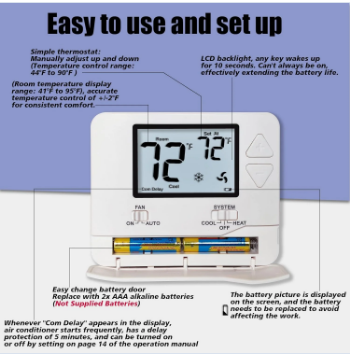
To get the most out of your ABS Digital RF Thermostat, take advantage of its advanced features—including programmable schedules and integration with Riseem’s smart home platform.
- Programming a Schedule:
-
- Press the “Program” button on the thermostat display.
-
- Use the arrows to select a time period (e.g., “Wake,” “Leave,” “Return,” “Sleep”) and set the desired temperature for each period.
-
- Choose whether the schedule applies to “Weekdays,” “Weekends,” or “All Days.”
-
- Press “Save” to confirm your settings. This feature helps reduce energy waste by lowering/raising the temperature when you’re not at home or asleep.
- Connecting to Riseem:
-
- The ABS Digital RF Thermostat is compatible with Riseem’s smart home app, which lets you control the thermostat remotely from your smartphone.
-
- Download the Riseem app from the App Store or Google Play (search for “Riseem Smart Home”).
-
- Open the app, create an account (or log in if you already have one), and select “Add Device.”
-
- Follow the app’s instructions to connect the thermostat to your home Wi-Fi network (ensure the RF receiver is powered on and within range).
-
- Once connected, you can adjust the temperature, change modes, and monitor energy usage from anywhere—even when you’re away from home.
For troubleshooting tips or more detailed guidance on advanced settings, visit www.riseem.cn—Riseem’s support page offers FAQs, video tutorials, and contact information for technical assistance.
####### 6. Maintenance Tips to Keep Your Thermostat Working Efficiently
To ensure your ABS Digital RF Thermostat continues to function accurately and efficiently, follow these simple maintenance steps:
- Clean the Display Regularly: Wipe the screen with a soft, dry cloth to remove dust and fingerprints—avoid using harsh chemicals or water, as this can damage the thermostat.
- Check the RF Receiver Connections: Every 6–12 months, turn off the power and inspect the wires on the RF receiver to ensure they’re secure and free from corrosion.
- Calibrate the Temperature (if needed): If you notice a discrepancy between the thermostat’s reading and an independent thermometer, refer to the user manual for calibration instructions (or check www.riseem.cn for a step-by-step guide).
- Replace Batteries (if applicable): Some models use backup batteries to retain settings during power outages. Replace the batteries annually or when the low-battery indicator appears on the display.
By following these maintenance tips, you can extend the lifespan of your ABS Digital RF Thermostat and ensure it provides reliable temperature control for years to come.
Final Thoughts
The ABS Digital RF Thermostat is a user-friendly, energy-efficient solution for managing your home’s heating and cooling systems. With its durable ABS construction, wireless RF connectivity, and seamless integration with Riseem’s smart home platform, it offers both convenience and control. Whether you’re a first-time user or a seasoned homeowner, this guide has covered everything you need to know—from installation to advanced settings.
For more information on the ABS Digital RF Thermostat or other smart home products from Riseem, be sure to visit www.riseem.cn. With Riseem’s commitment to innovation and customer support, you can trust that your thermostat will keep your home comfortable while helping you save energy.


Two stage thermostat 24V DC
what is the fireproof hvac thermostat
Related Article

This shift has made traditional, manual thermostats obsolete, paving the way for advanced smart technologies.
Why You Need a Smart Thermostat

A true 7 Day programmable room thermostat offers the ultimate granular control. It allows users to program a distinct, customized heating and cooling schedule for every single day of the week.
How a 7 Day Programmable Room Thermostat Maximizes Home Comfort and Efficiency

A premium Riseem thermostat is not just a digital display on your wall; it is the ultimate gatekeeper of your indoor environment.
Why a Quality Thermostat Is the Key to a More Comfortable Home

While the TUYA app provides the elegant interface, the physical thermostat remains the brain of the operation. Riseem has engineered a device that looks minimalist on your wall while delivering industrial-grade precision to your HVAC equipment.
Welcome to the Future of Home Automation The Ultimate Guide to TUYA WIFI Smart Thermostats