
blinking cool on thermostat
author: Somi
2025-04-23
What Does Blinking "Cool" on a Thermostat Mean?
1. Introduction
A thermostat is designed to keep your home comfortable, but when it displays a blinking "Cool" indicator, it’s trying to communicate something. This issue can be confusing, but understanding its meaning and troubleshooting steps can help you resolve it quickly, especially with thermostats from Ocean Controls Limited. In this blog, we’ll explore why "Cool" might blink and how to address it.
2. Common Reasons for a Blinking "Cool" Indicator
1. System Activation in Progress
- What It Means: When you set your thermostat to Cool mode, the "Cool" indicator may blink briefly as the thermostat signals the air conditioning (AC) system to start. This is normal during the initial startup and should stop once the AC unit activates.
- Ocean Controls Limited Thermostats: Models like the OceanSmart Pro series often show a blinking indicator during this handshake process to confirm the signal is sent to the AC.
2. Low Refrigerant or AC System Issues
- What It Means: A persistent blinking "Cool" could indicate low refrigerant (freon) in your AC unit. Low refrigerant prevents the system from cooling effectively, and the thermostat may repeatedly try to activate the AC, causing the indicator to blink.
- Risk: Ignoring this can lead to compressor damage or reduced AC lifespan.
3. Electrical or Wiring Problems
- What It Means: Loose or faulty wiring between the thermostat and the AC unit can disrupt communication. A blinking "Cool" may signal that the thermostat is sending a cooling command, but the AC isn’t receiving it due to wiring issues.
- Common Culprits: Corroded terminals, loose screws, or damaged wires, especially in older homes or after DIY thermostat installations.
4. Thermostat Calibration or Programming Errors
- What It Means: If the thermostat’s temperature sensor is miscalibrated, it may incorrectly think the room is warmer than it is, constantly trying to activate the AC. Blinking "Cool" could also occur if the schedule is programmed to call for cooling when it’s unnecessary (e.g., during winter).
- Ocean Controls Limited Tip: Many of their thermostats have auto-calibration features; check the manual for resetting instructions.
5. Safety or Protection Mode
- What It Means: Some thermostats, including advanced models from Ocean Controls Limited, have built-in safety features. A blinking "Cool" might indicate the AC is in a protection mode, such as a short-cycle delay to prevent damage from frequent on/off cycles.
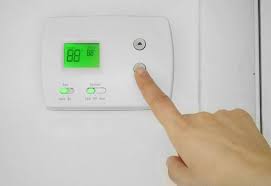
3. Troubleshooting Steps for a Blinking "Cool" Indicator
Step 1: Wait and Observe
- Initial Check: If the "Cool" indicator blinks for 1–2 minutes after setting the thermostat to Cool mode, it may simply be activating the AC. Give it time to start.
- When to Act: If it blinks for over 5 minutes or recurs frequently, proceed to the next steps.
Step 2: Verify Thermostat Settings
- Mode Selection: Ensure the thermostat is set to Cool mode (not Heat, Auto, or Off).
- Temperature Setting: Confirm the set temperature is lower than the current room temperature. If it’s too high, the AC won’t activate.
- Program Schedule: Check if a schedule is active that’s conflicting with your desired settings (e.g., a vacation mode set to a higher temperature).
Step 3: Inspect Wiring and Connections
- Turn Off Power: Switch off the AC circuit breaker to avoid electrical shock.
- Remove Thermostat Cover: Gently detach the cover to expose the wiring.
- Check Connections: Look for loose wires at the Y terminal (cooling signal) and R terminal (power). Tighten any loose screws.
- Inspect for Damage: Look for frayed wires or corrosion on terminals. If damaged, replace or repair the wiring.
- Tip: Ocean Controls Limited thermostats often have color-coded terminals (e.g., Y for yellow wire) for easy identification.
Step 4: Test for Low Refrigerant
- Professional Service: Low refrigerant is a complex issue requiring a licensed HVAC technician. They will use gauges to measure pressure and recharge the system if needed.
- Warning: Do not attempt to refill refrigerant yourself; it’s illegal without certification and can damage the AC.
Step 5: Reset or Recalibrate the Thermostat
- Soft Reset: Turn the thermostat off, remove batteries (if applicable), and wait 30 seconds before reinserting them or restoring power.
- Factory Reset: For persistent issues, use the thermostat’s reset function (usually in the settings menu). This will erase custom settings, so reprogram them afterward.
- Calibration: Use a calibrated thermometer to check if the thermostat’s temperature reading is accurate. Adjust the calibration in the settings if there’s a discrepancy.
4. When to Call a Professional
Signs of a Major Issue
- The AC unit makes unusual noises (e.g., grinding, hissing) when the "Cool" light blinks.
- The thermostat display is unresponsive or shows error codes (e.g., "E01" for sensor failure on Ocean Controls Limited models).
- The AC blows warm air or doesn’t turn on at all, even with a blinking "Cool" indicator.
Why Professional Help Matters
- Electrical issues and refrigerant problems require specialized knowledge to diagnose safely.
- Ocean Controls Limited recommends contacting an authorized HVAC technician for complex repairs to maintain warranty coverage.
5. Preventing Future Blinking Issues
Regular Maintenance
- Clean Air Filters: A clogged filter restricts airflow, making the AC work harder and triggering thermostat issues. Replace filters every 1–3 months.
- Annual AC Tune-Ups: Have a technician inspect the AC for leaks, clean coils, and check refrigerant levels.
Optimize Thermostat Settings
- Use Auto Mode: Instead of keeping the fan on "On," use "Auto" to reduce strain on the AC.
- Avoid Extreme Temperature Shifts: Gradually adjust settings to prevent short cycling (frequent on/off cycles).
Update Firmware (Smart Thermostats)
- Ocean Controls Limited regularly releases firmware updates to improve performance. Check the app or thermostat settings for updates to resolve bugs that may cause blinking indicators.
6. Conclusion
A blinking "Cool" indicator on your Ocean Controls Limited thermostat is a helpful alert, not a cause for panic. By following these troubleshooting steps, you can often resolve minor issues like loose wires or calibration errors. For more complex problems, such as low refrigerant or electrical faults, professional help is essential to avoid costly damage.
Remember, proper maintenance and proactive thermostat management will keep your cooling system running smoothly, ensuring a comfortable home all summer long. If you’re ever unsure, don’t hesitate to reach out to Ocean Controls Limited’s customer support or a trusted HVAC technician—they’re here to help!


how to replace a home thermostat
air conditioner thermostat wiring
Related Article

This shift has made traditional, manual thermostats obsolete, paving the way for advanced smart technologies.
Why You Need a Smart Thermostat

A true 7 Day programmable room thermostat offers the ultimate granular control. It allows users to program a distinct, customized heating and cooling schedule for every single day of the week.
How a 7 Day Programmable Room Thermostat Maximizes Home Comfort and Efficiency

A premium Riseem thermostat is not just a digital display on your wall; it is the ultimate gatekeeper of your indoor environment.
Why a Quality Thermostat Is the Key to a More Comfortable Home

While the TUYA app provides the elegant interface, the physical thermostat remains the brain of the operation. Riseem has engineered a device that looks minimalist on your wall while delivering industrial-grade precision to your HVAC equipment.
Welcome to the Future of Home Automation The Ultimate Guide to TUYA WIFI Smart Thermostats