
How to use a thermostat for floor heating
author: Bani
2025-03-19
How to Use a Thermostat for Floor Heating
Introduction
A floor heating thermostat is your key to a warm and cozy home during the colder months. Properly using this device can enhance your comfort and save energy. Ocean Controls Limited, a trusted name in the thermostat industry, offers a range of high - quality floor heating thermostat options. This blog will guide you through the steps of using a floor heating thermostat, with a focus on Ocean Controls Limited's products.
Initial Setup of the Floor Heating Thermostat
Unpacking and Inspection
When you first receive your floor heating thermostat from Ocean Controls Limited, carefully unpack the package. Check that all components are included, such as the thermostat unit, sensor (if it's a separate part), mounting hardware, and batteries (for battery - powered models). Inspect the thermostat for any signs of damage during transit. If you notice any issues, contact Ocean Controls Limited's customer support immediately.
Mounting the Thermostat
The next step is to mount the thermostat on the wall. Ocean Controls Limited provides clear instructions on the optimal height and location for mounting. In general, it should be placed at a convenient eye - level, away from direct sunlight, heat sources like radiators, and drafty areas. Use the provided mounting hardware to securely attach the thermostat to the wall. If it's a wireless thermostat, make sure it's within range of the floor heating system's receiver.
Connecting to the Floor Heating System
For wired floor heating thermostat models, you'll need to connect the thermostat to the floor heating system's wiring. This step is best done by a professional HVAC technician. However, if you're confident in your electrical skills and follow the detailed wiring diagrams provided by Ocean Controls Limited, you can attempt it. Ensure that the power to the floor heating system is turned off before starting the wiring process. For wireless thermostats, pair the thermostat with the floor heating system according to the manufacturer's instructions. This usually involves entering a unique code or using a pairing button on both devices.

Setting the Temperature
Understanding the Controls
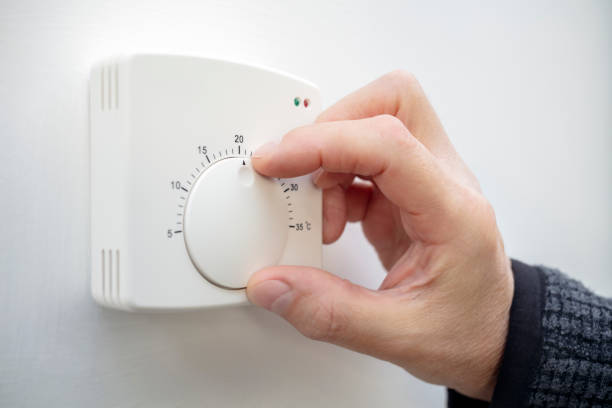
Ocean Controls Limited's floor heating thermostat has user - friendly controls. Familiarize yourself with the buttons or touch - screen interface. There are typically buttons for increasing and decreasing the temperature. Some models also have a mode button to switch between different operating modes, such as manual, programmable, or energy - saving mode.
Adjusting the Temperature
To set the desired floor temperature, simply press the temperature adjustment buttons. For example, if you want to increase the temperature from 22°C to 24°C, press the plus (+) button until the display shows 24°C. On touch - screen models, you can use your finger to slide the temperature slider to the desired value. The thermostat will then send a signal to the floor heating system to adjust the heat output accordingly.
Using Programmable Schedules
Accessing the Programming Menu
Many Ocean Controls Limited floor heating thermostat models offer programmable schedules. To access the programming menu, look for a dedicated "Program" or "Schedule" button on the thermostat. Press this button, and the display will show options for setting different temperature schedules.
Setting Daily and Weekly Schedules
In the programming menu, you can set different temperatures for various times of the day. For example, you can program the thermostat to lower the temperature to 20°C at night when you're sleeping and raise it to 23°C in the morning when you wake up. You can also set different schedules for each day of the week. This allows you to customize the floor heating according to your daily routine, saving energy when you don't need the full heat.
Energy - Saving Features
Activating Energy - Saving Mode
Ocean Controls Limited's thermostats often have an energy - saving mode. To activate this mode, look for an "Eco" or "Energy - Save" button on the thermostat. Pressing this button will set the thermostat to a pre - programmed energy - saving temperature. In energy - saving mode, the thermostat may set a slightly lower temperature during periods when the house is unoccupied or when you're asleep, reducing energy consumption without sacrificing too much comfort.

Adaptive Energy - Saving
Some of their advanced floor heating thermostat models come with adaptive energy - saving features. These thermostats can learn your temperature preferences over time and adjust the settings to save energy. For example, if they notice that you often lower the temperature in the evening, they may start to automatically make this adjustment a few minutes earlier each day.
Remote Control and Connectivity
Using the Mobile App
If your floor heating thermostat from Ocean Controls Limited is Wi - Fi enabled, you can control it remotely using a mobile app. Download the app from your device's app store. Log in using your account credentials and pair the app with your thermostat. Once paired, you can adjust the temperature, view the current temperature, and manage the programmable schedules from anywhere with an internet connection.
Voice Control Integration
Many Ocean Controls Limited thermostats are compatible with popular smart assistants like Amazon Alexa and Google Assistant. To enable voice control, link the thermostat to your smart assistant according to the setup instructions. Once integrated, you can use voice commands to control the floor heating thermostat. For example, you can say, "Alexa, set the floor temperature to 22°C" or "Hey Google, turn on the floor heating."
Maintenance and Troubleshooting
Regular Maintenance
To keep your floor heating thermostat in good working condition, perform regular maintenance. If it's a battery - powered thermostat, replace the batteries regularly. Clean the sensor area of the thermostat to ensure accurate temperature detection. If the thermostat has Wi - Fi connectivity, check for software updates regularly and install them to keep the thermostat functioning optimally.
Troubleshooting Common Issues
If you encounter issues with your floor heating thermostat, such as inaccurate temperature readings or unresponsive controls, start by checking the batteries (if applicable) and the wiring connections. If the problem persists, consult the user manual provided by Ocean Controls Limited. Their customer support team is also available to assist you with troubleshooting. You can contact them through their official website or by phone.


Conclusion
Using a floor heating thermostat effectively can significantly enhance the comfort of your home while saving energy. By following the steps for initial setup, temperature adjustment, using programmable schedules, and taking advantage of energy - saving and remote - control features, you can make the most of your floor heating system. Ocean Controls Limited's range of floor heating thermostat products, with their user - friendly design and advanced features, makes it easier than ever to manage your home's heating. Remember to perform regular maintenance and seek help when needed to ensure your thermostat continues to function properly.
How to choose a single-unit programmable thermostat suitable for home use
How does a floor heating thermostat work
Related Article

This shift has made traditional, manual thermostats obsolete, paving the way for advanced smart technologies.
Why You Need a Smart Thermostat

A true 7 Day programmable room thermostat offers the ultimate granular control. It allows users to program a distinct, customized heating and cooling schedule for every single day of the week.
How a 7 Day Programmable Room Thermostat Maximizes Home Comfort and Efficiency

A premium Riseem thermostat is not just a digital display on your wall; it is the ultimate gatekeeper of your indoor environment.
Why a Quality Thermostat Is the Key to a More Comfortable Home

While the TUYA app provides the elegant interface, the physical thermostat remains the brain of the operation. Riseem has engineered a device that looks minimalist on your wall while delivering industrial-grade precision to your HVAC equipment.
Welcome to the Future of Home Automation The Ultimate Guide to TUYA WIFI Smart Thermostats