
How to use HVAC thermostat
author: Somi
2025-03-11
How to Use HVAC Thermostat
In the quest for a comfortable indoor environment, understanding how to use your HVAC thermostat effectively is key. Whether you're dealing with the sweltering heat of summer or the chilly winds of winter, the thermostat serves as your control center, dictating the temperature of your living or working space. Let's explore the steps to make the most of this essential device, with a nod to the offerings from Ocean Controls Limited.
1. Familiarize Yourself with the Thermostat Unit
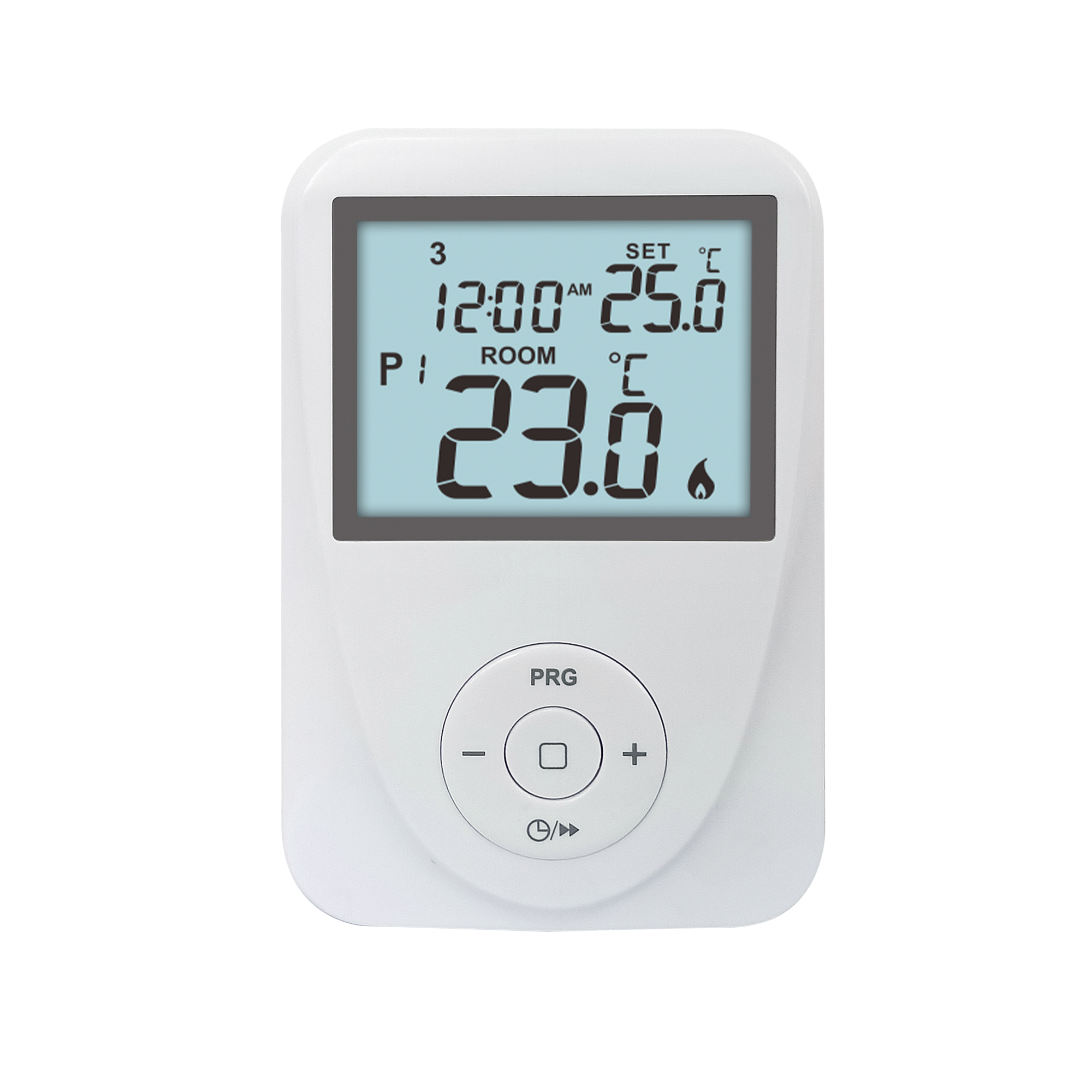
Before making any adjustments, take a moment to get acquainted with your thermostat. If it's a model from Ocean Controls Limited, you'll notice its sleek design and user-friendly layout. Locate the display screen, which typically shows the current room temperature and other relevant information. Identify the buttons or touch controls – some thermostats have a simple dial for basic adjustments, while more advanced models feature touchscreens with intuitive icons. Spend a few minutes exploring the different functions and what each button does. This initial familiarity will make subsequent operations much smoother.
2. Setting the Desired Temperature
Manual Temperature Adjustment
For immediate comfort, you can manually set the temperature. If it's a hot day and you want to cool down the room, look for the “-” button on your thermostat. Press it to lower the temperature setting. Conversely, if it's cold and you need warmth, use the “+” button to increase the temperature. Ocean Controls Limited's thermostats often have clearly labeled buttons, making it easy to make these quick changes. For example, if you enter a room that feels stuffy and warm, you can simply press the “-” button a few times until you reach a more comfortable temperature.
Using the Keypad or Touchscreen
On touchscreen models, you can directly enter the desired temperature using the keypad. Just tap on the temperature display area, and a numeric keypad will appear. Enter the number you want, and the thermostat will register the new setting. This method gives you precise control over the temperature. Say you have a specific comfort temperature in mind, like 22°C (72°F), you can quickly input that value and let the thermostat do its job.
3. Understanding and Utilizing Programmable Features
Programming Daily Schedules
Many modern thermostats, including those by Ocean Controls Limited, offer programmable capabilities. To save energy and maintain comfort throughout the day, you can set different temperature schedules. For instance, you might want to lower the temperature during the day when you're at work and raise it just before you return home. Navigate to the “Program” or “Schedule” section on your thermostat. Here, you can set specific times and temperatures for different periods, such as morning, afternoon, evening, and night. Follow the on-screen prompts to input your preferences. If you leave for work at 8 am and return at 6 pm, you could program the thermostat to lower the temperature to 18°C (64°F) during your absence and raise it to 20°C (68°F) at 5:30 pm.
Weekend and Holiday Settings
Don't forget to account for weekends and holidays when programming. You may have a different routine on these days, so adjust the schedule accordingly. Some thermostats allow you to create separate profiles for weekdays and weekends, while others let you customize each day individually. Ocean Controls Limited's thermostats offer flexible programming options to fit your lifestyle. If it's a lazy Sunday and you plan to stay home all day, you can set a constant, comfortable temperature for the entire day.
4. Making the Most of Smart and Remote Control Features
Connecting to Wi-Fi
If your thermostat is a smart model from Ocean Controls Limited, it likely has Wi-Fi connectivity. To enable remote control, you'll need to connect it to your home network. Follow the setup instructions provided. Typically, you'll enter your Wi-Fi password and wait for the thermostat to sync. Once connected, you can access the thermostat's controls via a smartphone app. This means you can adjust the temperature even when you're not at home. If you're stuck in traffic on a hot day and want to cool down your house before you arrive, you can use the app to turn on the air conditioner.
Controlling from Afar
With the app installed on your phone, you can control the thermostat no matter where you are. You can check the current temperature in your home, adjust the settings, and even view energy usage reports. The app provides an added level of convenience and flexibility. Maybe you're on vacation and want to make sure your home isn't using too much energy – you can easily lower the temperature setting remotely.


5. Troubleshooting Common Issues
Temperature Inaccuracies
Sometimes, you may notice that the thermostat reading doesn't seem to match the actual room temperature. Check if the thermostat is installed in a proper location, away from direct sunlight, drafts, or heat sources. If it's still inaccurate, it could be due to a calibration issue. Some thermostats, like those from Ocean Controls Limited, have a calibration function. Refer to the manual to learn how to recalibrate the temperature sensor. If your thermostat is reading 25°C (77°F) but it feels much cooler in the room, it might be time to recalibrate.
Unresponsive Buttons or Touchscreen
If the buttons or touchscreen aren't working as expected, first try cleaning them gently with a soft, dry cloth. If that doesn't solve the problem, check if the thermostat has power. It could be a loose wire or a drained battery (if it's a battery-powered model). In case of more serious issues, contact the customer support of Ocean Controls Limited for assistance. If your touchscreen is frozen and not responding to any taps, a simple power cycle might be all it takes to get it back to normal.
6. Conclusion
Using your HVAC thermostat effectively is crucial for achieving a comfortable and energy-efficient indoor environment. By familiarizing yourself with the unit, setting temperatures accurately, using programmable and smart features, and troubleshooting common problems, you can make the most of your thermostat. Whether it's a basic model or a high-tech offering from Ocean Controls Limited, these steps will ensure you have optimal control over your indoor climate. So, take the time to master the operation of your thermostat and enjoy a cozy living environment all year round.
What is a wired thermostat
Home Thermostat Essentials
Related Article

This shift has made traditional, manual thermostats obsolete, paving the way for advanced smart technologies.
Why You Need a Smart Thermostat

A true 7 Day programmable room thermostat offers the ultimate granular control. It allows users to program a distinct, customized heating and cooling schedule for every single day of the week.
How a 7 Day Programmable Room Thermostat Maximizes Home Comfort and Efficiency

A premium Riseem thermostat is not just a digital display on your wall; it is the ultimate gatekeeper of your indoor environment.
Why a Quality Thermostat Is the Key to a More Comfortable Home

While the TUYA app provides the elegant interface, the physical thermostat remains the brain of the operation. Riseem has engineered a device that looks minimalist on your wall while delivering industrial-grade precision to your HVAC equipment.
Welcome to the Future of Home Automation The Ultimate Guide to TUYA WIFI Smart Thermostats