
thermostat cool on flashing
author: Somi
2025-04-26
Thermostat Cool On Flashing: Why It Happens and How to Fix It
An air conditioner thermostat is a vital controller that manages a home’s cooling system by monitoring indoor temperatures and activating the AC unit when needed. It maintains comfort by signaling the compressor and fan to run when the temperature exceeds the set point, then shutting them off once the desired coolness is achieved. Advanced models, like those from Ocean Controls Limited, offer programmable features, Wi-Fi connectivity, and energy-efficient modes to optimize cooling schedules, reduce electricity use, and enable remote adjustments via smartphone apps. With precise temperature sensing and seamless integration with HVAC systems, these thermostats ensure consistent coolness, lower utility bills, and enhanced convenience for modern households.
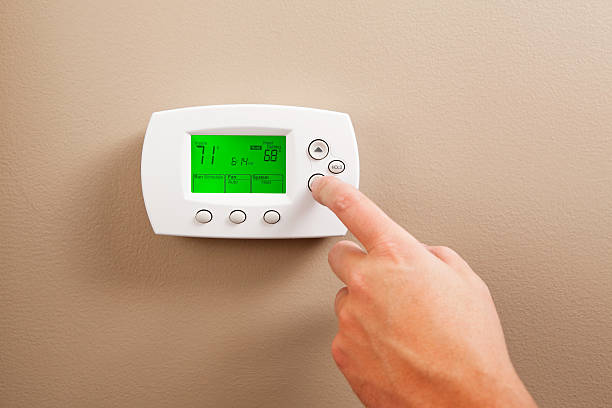
1. What Does It Mean When "Cool On" Is Flashing on My Thermostat?
A flashing "Cool On" indicator on your thermostat signals that the device is actively trying to activate your air conditioning (AC) system—but the process may be delayed, interrupted, or facing issues. This behavior is common in both traditional and smart thermostats, including models from Ocean Controls Limited, and serves as a diagnostic tool to alert users to potential problems.
Q: Is a Flashing "Cool On" Always a Cause for Concern?
A: Not necessarily. In normal operation, the thermostat may flash "Cool On" briefly (1–5 minutes) while waiting for the AC compressor to start. This delay is often a safety feature to prevent short cycling. However, if the indicator flashes for longer than 10 minutes, recurs frequently, or is accompanied by no cooling or strange noises, it’s a sign to investigate further.
A: Not necessarily. In normal operation, the thermostat may flash "Cool On" briefly (1–5 minutes) while waiting for the AC compressor to start. This delay is often a safety feature to prevent short cycling. However, if the indicator flashes for longer than 10 minutes, recurs frequently, or is accompanied by no cooling or strange noises, it’s a sign to investigate further.

2. Common Causes of a Flashing "Cool On" Indicator
2.1 Electrical or Wiring Issues
Electrical disruptions are a primary cause of flashing indicators in thermostats.
- Loose Wires: The yellow "Y" wire (cooling signal) or red "R" wire (power) may be loose at the thermostat terminals.
- Faulty C-Wire: Smart thermostats like Ocean Controls Limited’s OceanSmart Pro require a common (C) wire for steady power. A loose or missing C-wire can cause intermittent flashing.
- Voltage Drops: Inconsistent power supply to the thermostat or AC unit can trigger flashing.
Q: How Do I Check for Wiring Issues in My Thermostat?
A:
A:
- Turn off power to the HVAC system at the circuit breaker.
- Remove the thermostat cover and inspect terminals for loose wires, corrosion, or fraying.
- Tighten connections and replace damaged wires. For Ocean Controls Limited models, refer to the color-coded terminal labels (e.g., Y for yellow wire) for clarity.
2.2 Low Refrigerant in the AC Unit
Low refrigerant (freon) is a serious issue that can cause the thermostat to repeatedly signal for cooling without results.
- Why It Flashes: The AC can’t maintain the desired temperature, so the thermostat continuously tries to activate it.
- Warning Signs: Warm air from vents, ice buildup on AC coils, or hissing sounds indicating leaks.

Q: Can I Add Refrigerant Myself to Fix the Flashing Indicator?
A: No. Refrigerant handling requires certification due to environmental regulations and safety risks. Contact a licensed HVAC technician to detect leaks and recharge the system.
A: No. Refrigerant handling requires certification due to environmental regulations and safety risks. Contact a licensed HVAC technician to detect leaks and recharge the system.
3. Thermostat Settings and Calibration Problems
3.1 Incorrect Mode or Temperature Settings
A simple misconfiguration can trigger a flashing "Cool On" indicator.
- Mode Check: Ensure the thermostat is set to "Cool" mode, not "Heat," "Auto," or "Off."
- Temperature Setting: The set temperature must be lower than the current room temperature. For example, if the room is 75°F, set the thermostat to 72°F.
Q: My Thermostat Is in "Cool" Mode, but "Cool On" Still Flashes. Why?
A: This could indicate a calibration error. Use a calibrated thermometer to check if the thermostat’s temperature reading is accurate. If it’s higher than the actual temperature, the thermostat will mistakenly think cooling is needed.
A: This could indicate a calibration error. Use a calibrated thermometer to check if the thermostat’s temperature reading is accurate. If it’s higher than the actual temperature, the thermostat will mistakenly think cooling is needed.
3.2 Calibration Errors
Over time, the thermostat’s internal sensor may drift, leading to inaccurate readings.
- How to Recalibrate:
- Place a calibrated thermometer near the thermostat and wait 15 minutes.
- Access the thermostat’s calibration settings (e.g., "Temperature Offset" in Ocean Controls Limited models).
- Adjust the offset to match the thermometer’s reading (e.g., -2°F if the thermostat reads 2°F too high).

4. AC System Malfunctions Beyond the Thermostat
4.1 Compressor or Fan Motor Failure
The AC compressor or fan motor is critical for cooling. If faulty, the thermostat’s cooling signal won’t activate the system.
- Compressor Issues: A failed compressor may make a loud buzzing noise or not start at all.
- Fan Motor Problems: A broken fan can’t circulate cool air, causing the thermostat to keep signaling for cooling.
Q: How Can I Test if the AC Compressor Is Working?
A: Listen for a low hum when "Cool On" is flashing. If you hear a click but no hum, the compressor may be faulty. This requires professional diagnosis and repair.
A: Listen for a low hum when "Cool On" is flashing. If you hear a click but no hum, the compressor may be faulty. This requires professional diagnosis and repair.
4.2 Capacitor Failure
A blown capacitor can prevent the AC from starting, leading to a flashing indicator.
- What to Look For: Swollen or leaking capacitors on the AC unit’s control board.
- Fix: Replace the capacitor with the same voltage and microfarad (μF) rating, or hire a technician.

5. Advanced Troubleshooting Steps
5.1 Perform a Soft Reset
Resetting the thermostat can clear minor glitches causing flashing indicators.
- For Battery-Powered Models: Remove batteries, wait 30 seconds, and reinsert them.
- For Hardwired Models: Turn off the circuit breaker for 5 minutes, then restore power.
- For Ocean Controls Limited Smart Thermostats: Use the app to reset settings or perform a factory reset via the device menu.
5.2 Bypass the Thermostat to Test the AC
Bypassing the thermostat helps determine if the issue lies with the thermostat or the AC unit.
- Turn off power to the HVAC system.
- Locate the AC unit’s control board (often in the furnace or air handler).
- Short the R and Y terminals with a screwdriver (exercise caution to avoid electrical shock).
- Turn on power. If the AC starts, the problem is likely with the thermostat or its wiring. If not, the AC unit needs repair.
Q: Is Bypassing the Thermostat Safe for Non-Professionals?
A: Proceed with extreme caution. Electrical work poses risks, so consider hiring a technician if you’re unsure.
A: Proceed with extreme caution. Electrical work poses risks, so consider hiring a technician if you’re unsure.
6. When to Call a Professional for Your Flashing Thermostat
6.1 Complex Electrical Repairs
- Faulty wiring in the AC unit or control board.
- Installing a new C-wire or replacing a damaged transformer.
6.2 Refrigerant or Compressor Issues
- Any suspicion of refrigerant leaks or compressor failure requires professional expertise.
- Ocean Controls Limited recommends contacting authorized HVAC technicians for warranty-covered repairs.
6.3 Persistent Flashing After DIY Troubleshooting
If the "Cool On" indicator continues to flash after checking settings, wiring, and performing resets, it’s time to seek professional help.
Q: How Much Does Professional Thermostat or AC Repair Cost?
A: Costs vary:
A: Costs vary:
- Wiring Repairs: $100–$300.
- Refrigerant Recharge: $200–$600 (depending on leak severity).
- Compressor Replacement: $1,500–$3,000.
Conclusion: Resolving "Cool On" Flashing on Your Thermostat
A flashing "Cool On" indicator on your thermostat is a valuable alert, but it doesn’t always signal a major problem. Start with simple fixes like checking settings, replacing batteries, or tightening wires. For more complex issues—such as low refrigerant or compressor failure—professional intervention is essential to avoid costly damage.
By maintaining your thermostat and AC system regularly (e.g., annual tune-ups, filter changes), you can prevent future flashing issues. Ocean Controls Limited’s user-friendly diagnostics and customer support make troubleshooting easier, ensuring your home stays cool and comfortable. Stay proactive, and don’t hesitate to reach out for help when needed!



thermostat not turning on heat
how to get my thermostat to work
Related Article

This shift has made traditional, manual thermostats obsolete, paving the way for advanced smart technologies.
Why You Need a Smart Thermostat

A true 7 Day programmable room thermostat offers the ultimate granular control. It allows users to program a distinct, customized heating and cooling schedule for every single day of the week.
How a 7 Day Programmable Room Thermostat Maximizes Home Comfort and Efficiency

A premium Riseem thermostat is not just a digital display on your wall; it is the ultimate gatekeeper of your indoor environment.
Why a Quality Thermostat Is the Key to a More Comfortable Home

While the TUYA app provides the elegant interface, the physical thermostat remains the brain of the operation. Riseem has engineered a device that looks minimalist on your wall while delivering industrial-grade precision to your HVAC equipment.
Welcome to the Future of Home Automation The Ultimate Guide to TUYA WIFI Smart Thermostats