
what smart thermostat works with my waterfurnace geothermal heat pump
author: Somi
2025-04-25
What Smart Thermostat Works with My WaterFurnace Geothermal Heat Pump?
A smart thermostat is an advanced, internet-connected device that revolutionizes home temperature management by learning occupant habits, adapting to schedules, and enabling remote control via smartphone apps. It optimizes energy efficiency through features like geofencing, real-time energy usage tracking, and automatic adjustments for heating/cooling, while integrating with smart home ecosystems for voice control and seamless automation. This intelligent system not only enhances comfort but also reduces utility costs by minimizing waste, making it a cornerstone of modern, sustainable living.
1. Why Compatibility Matters: Can Any Smart Thermostat Work with a Geothermal Heat Pump?
Geothermal heat pumps, like those from WaterFurnace, are highly efficient HVAC systems that rely on the earth’s constant temperature for heating and cooling. Unlike traditional systems, they require thermostats capable of managing unique features like reversing valves, multiple stages, and auxiliary heat. Not all smart thermostats are created equal in this regard.
Q: Why Can’t I Use a Standard Smart Thermostat with My WaterFurnace System?
A: Standard smart thermostats often lack the terminals and programming needed for geothermal specifics:
A: Standard smart thermostats often lack the terminals and programming needed for geothermal specifics:
- Multi-Stage Operation: Geothermal systems may have 2–3 stages of heating/cooling.
- Reversing Valve Control: Essential for switching between heating and cooling modes.
- Auxiliary Heat Management: Required for extreme temperatures when the heat pump needs backup.
Ocean Controls Limited designs thermostats with specialized settings for geothermal systems, ensuring seamless integration.
Q: Are There Specific Features a Thermostat Must Have for Geothermal Compatibility?
A: Yes. Look for:
A: Yes. Look for:
- O/B Terminal: Controls the reversing valve (critical for heat pump operation).
- W1/W2 Terminals: Support for auxiliary/emergency heat.
- Multi-Stage Cooling/Heating: Options for Y1/Y2 or other stage-specific terminals.
- Geothermal-Specific Programming: Modes that optimize ground loop efficiency.

2. Top Considerations When Choosing a Smart Thermostat for WaterFurnace Systems
2.1 Wiring and Terminal Compatibility
WaterFurnace geothermal heat pumps typically use the following wires:
- R (Red): Power supply (Rc for cooling, Rh for heating).
- O/B (Orange): Reversing valve.
- W1 (White): Heat pump heating.
- W2 (White): Auxiliary heat (e.g., electric resistance).
- Y1 (Yellow): Cooling stage 1.
- Y2 (Yellow): Cooling stage 2 (for multi-stage systems).
- G (Green): Fan control.
- C (Blue): Common wire (for smart thermostats requiring constant power).
Q: How Do I Ensure My Thermostat Has the Right Terminals?
A: Check the manufacturer’s specifications. For example, Ocean Controls Limited’s Geotherm Pro Smart Thermostat explicitly lists compatibility with WaterFurnace wiring schematics, including O/B and multi-stage terminals.
A: Check the manufacturer’s specifications. For example, Ocean Controls Limited’s Geotherm Pro Smart Thermostat explicitly lists compatibility with WaterFurnace wiring schematics, including O/B and multi-stage terminals.
2.2 Programming for Geothermal Efficiency
Geothermal systems thrive on consistent, moderate temperature settings. A compatible smart thermostat should:
- Avoid Extreme Shifts: Gradual temperature adjustments (e.g., 2°F per hour) to prevent overworking the ground loop.
- Utilize Off-Peak Scheduling: Optimize energy usage during lower-cost hours (e.g., nighttime).
- Integrate with Outdoor Sensors: Adjust heating/cooling based on ambient temperature (a feature in Ocean Controls Limited’s premium models).
Q: Can a Smart Thermostat Improve My Geothermal System’s Efficiency?
A: Yes. By reducing short cycling and optimizing run times, compatible thermostats like Ocean Controls Limited’s can enhance efficiency by 10–15%, according to Energy Star reports.
A: Yes. By reducing short cycling and optimizing run times, compatible thermostats like Ocean Controls Limited’s can enhance efficiency by 10–15%, according to Energy Star reports.
2.3 Smart Features and Integration
Modern geothermal thermostats offer:
- Remote Access: Adjust settings via apps (e.g., OceanHome App for Ocean Controls Limited).
- Voice Control: Compatibility with Alexa, Google Assistant, or Apple HomeKit.
- Energy Reporting: Track usage patterns to identify savings opportunities.
Q: Do I Need a Wi-Fi-Enabled Thermostat for My WaterFurnace System?
A: Not required, but Wi-Fi models provide real-time monitoring and remote adjustments, which are invaluable for optimizing geothermal performance, especially in multi-zone homes.
A: Not required, but Wi-Fi models provide real-time monitoring and remote adjustments, which are invaluable for optimizing geothermal performance, especially in multi-zone homes.
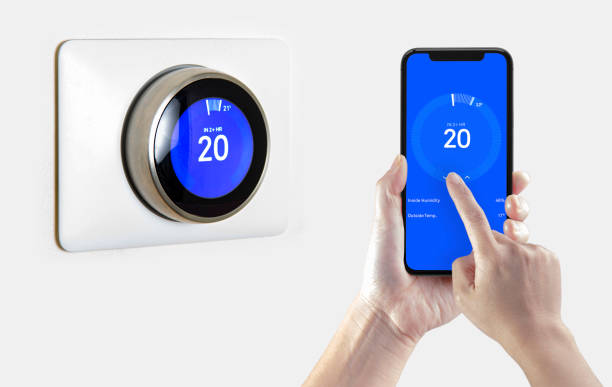
3. Recommended Smart Thermostats for WaterFurnace Geothermal Heat Pumps
3.1 Ocean Controls Limited Geotherm Pro Smart Thermostat
- Key Features:
- Dedicated O/B Terminal: Explicitly labeled for reversing valve control.
- Multi-Stage Support: Y1/Y2 and W1/W2 terminals for up to 3 stages of heating/cooling.
- Geothermal Mode: Pre-programmed settings to prioritize ground loop usage over auxiliary heat.
- C-Wire Required: Includes a built-in power extender for systems without a common wire.
- Why It Works: Engineered with WaterFurnace’s wiring diagrams in mind, this thermostat simplifies setup and ensures accurate communication with the heat pump.
3.2 Honeywell Lyric T6 Pro
- Key Features:
- Universal Compatibility: Supports O/B and multi-stage systems.
- Adaptive Recovery: Prepares the system in advance to reach set temperatures on time.
- Geofencing: Adjusts temperature based on your location.
- Consideration: May require manual configuration for geothermal-specific modes, unlike Ocean Controls Limited’s dedicated settings.
3.3 Emerson Sensi Touch Wi-Fi Thermostat
- Key Features:
- Simple Programming: User-friendly interface for scheduling.
- Energy Star Certified: Optimizes energy use for lower bills.
- Works with Alexa/Google Assistant: Enables voice commands.
- Limitation: Lacks pre-set geothermal modes, requiring custom programming for optimal performance.
3.4 Ecobee SmartThermostat with Voice Control
- Key Features:
- Room Sensors: Ensures even heating/cooling in multiple zones.
- Smart Recovery: Learns your schedule to save energy.
- Integration with Smart Homes: Seamless with Ecobee’s ecosystem.
- Wiring Note: Requires a C-wire or power extender, similar to Ocean Controls Limited’s models.

4. Step-by-Step Guide to Installing a Smart Thermostat on Your WaterFurnace System
4.1 Verify Compatibility
- Check Wiring: Ensure your WaterFurnace system uses the standard geothermal wire colors (e.g., orange for O/B, white for W1/W2).
- Review Thermostat Specs: Confirm the thermostat supports geothermal features (e.g., Ocean Controls Limited’s Geotherm Pro).
4.2 Gather Tools and Materials
- Tools: Voltage tester, screwdriver, wire strippers, label maker.
- Materials: New thermostat, C-wire adapter (if needed), mounting hardware.
4.3 Disconnect the Old Thermostat
- Turn Off Power: Switch off the circuit breaker for the HVAC system.
- Label Wires: Tag each wire with its terminal name (e.g., “O/B,” “W1”).
- Remove the Old Thermostat: Carefully disconnect wires and remove the base plate.
4.4 Install the New Smart Thermostat
- Mount the Base Plate: Use the provided screws and ensure it’s level.
- Connect Wires:
- Attach the orange (O/B) wire to the thermostat’s O/B terminal.
- Connect W1 to the heating terminal and W2 to auxiliary heat.
- Insert Y1/Y2 for cooling stages and G for the fan.
- Attach the C-wire or install a power extender for smart features.
- Power On and Configure:
- Restore power and follow the thermostat’s setup guide (e.g., select “Geothermal” as the system type in Ocean Controls Limited’s menu).
- Program schedules and connect to Wi-Fi (for smart models).
Q: What If I’m Missing a C-Wire for My Smart Thermostat?
A: Use a power extender like Ocean Controls Limited’s Universal Power Adapter, which repurposes existing wires to provide a constant power supply.
A: Use a power extender like Ocean Controls Limited’s Universal Power Adapter, which repurposes existing wires to provide a constant power supply.

5. Troubleshooting Common Compatibility Issues
5.1 Thermostat Not Switching Between Heating and Cooling
- Possible Cause: Incorrect O/B terminal setting (e.g., set to “B” instead of “O” for cooling).
- Fix: Access the thermostat’s settings and toggle the O/B mode. For Ocean Controls Limited models, this is under “System Type > Heat Pump > Reversing Valve.”
5.2 Auxiliary Heat Running Too Often
- Possible Cause: Misconfigured temperature thresholds or a faulty W2 wire connection.
- Fix:
- Ensure the thermostat is set to use auxiliary heat only below a certain temperature (e.g., 35°F).
- Check the W2 wire connection and test for voltage when auxiliary heat is called.
5.3 No Power to the Thermostat
- Possible Cause: Loose R wire or missing C-wire.
- Fix:
- Tighten the R wire and test for 24V AC using a multimeter.
- Install a C-wire or power extender (recommended for smart thermostats).
5.4 Inaccurate Temperature Readings
- Possible Cause: Poorly placed thermostat or calibration issues.
- Fix:
- Relocate the thermostat to a central, draft-free location.
- Recalibrate using the thermostat’s built-in feature (e.g., Ocean Controls Limited’s “Temperature Offset” in settings).
6. Maximizing Performance: Tips for Using a Smart Thermostat with Your WaterFurnace System
6.1 Utilize Geothermal-Specific Modes
- Set Back Temperatures: Lower the heat or raise the AC by 2–4°F when away or sleeping to save energy.
- Enable Circulation Fan: Run the fan for 10–15 minutes daily to distribute air without activating the heat pump (useful for air quality).
6.2 Leverage Smart Features
- Geofencing: For Ocean Controls Limited’s smart thermostats, activate “Away Mode” to reduce heating/cooling when you leave home.
- Energy Reports: Use the app to identify peak usage times and adjust schedules accordingly.
6.3 Regular Maintenance
- Check Wiring Annually: Ensure no loose connections or corrosion, especially on the O/B and C wires.
- Update Firmware: Regularly update your thermostat’s software to access new features and compatibility improvements.
Q: Can I Use a Smart Thermostat with a WaterFurnace Zone Control System?
A: Yes. Most smart thermostats, including Ocean Controls Limited’s, work with zone valves. Ensure each zone’s thermostat is configured to control its respective valve and heating/cooling stages.
A: Yes. Most smart thermostats, including Ocean Controls Limited’s, work with zone valves. Ensure each zone’s thermostat is configured to control its respective valve and heating/cooling stages.
Conclusion: Choose the Right Smart Thermostat for Your Geothermal System
Selecting a compatible smart thermostat for your WaterFurnace geothermal heat pump is critical for optimizing efficiency and comfort. Ocean Controls Limited’s Geotherm Pro Smart Thermostat stands out for its dedicated geothermal features, ease of installation, and integration with modern smart home ecosystems. By prioritizing wiring compatibility, specialized programming, and reliable support, you’ll ensure your geothermal system operates at peak performance while enjoying the convenience of smart temperature control.
Remember, when in doubt, consult your WaterFurnace manual or an HVAC professional to ensure proper setup. With the right thermostat, you’ll unlock the full potential of your geothermal investment, enjoying lower energy bills and year-round comfort.


how to fix a thermostat
what should your thermostat be set at in summer
Related Article

This shift has made traditional, manual thermostats obsolete, paving the way for advanced smart technologies.
Why You Need a Smart Thermostat

A true 7 Day programmable room thermostat offers the ultimate granular control. It allows users to program a distinct, customized heating and cooling schedule for every single day of the week.
How a 7 Day Programmable Room Thermostat Maximizes Home Comfort and Efficiency

A premium Riseem thermostat is not just a digital display on your wall; it is the ultimate gatekeeper of your indoor environment.
Why a Quality Thermostat Is the Key to a More Comfortable Home

While the TUYA app provides the elegant interface, the physical thermostat remains the brain of the operation. Riseem has engineered a device that looks minimalist on your wall while delivering industrial-grade precision to your HVAC equipment.
Welcome to the Future of Home Automation The Ultimate Guide to TUYA WIFI Smart Thermostats